
.png)
Description
Download Tidio – AI‑Powered Live Chat, Help Desk & Automation Tool
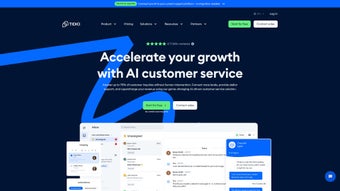
Tidio is a modern, AI‑driven customer‑service platform that brings live chat, a robust help‑desk, and powerful automation together in a single, easy‑to‑use interface. In an era where instant communication has become the baseline expectation, Tidio’s multilingual Lyro AI Agent answers routine questions, routes complex tickets to human agents, and continuously learns from every interaction. The result is a reduction in response time, lower support costs, and higher satisfaction scores. Whether you run a small boutique e‑commerce shop, a fast‑growing SaaS startup, or a large enterprise with multiple brand sites, Tidio scales effortlessly thanks to its cloud‑native architecture and flexible pricing model. The platform also offers a visual Flow builder, pre‑configured templates for cart recovery, welcome messages, and post‑purchase follow‑ups, which can be activated with a few clicks. Native integrations with popular marketing and e‑commerce tools such as Mailchimp, HubSpot, Shopify, and WordPress mean you can keep using the applications you already love while gaining a unified view of every customer conversation. Security is baked in: GDPR compliance, SSL encryption, and role‑based access controls keep data safe across all touchpoints. In short, Tidio delivers a secure, scalable, and feature‑rich solution that helps businesses turn support interactions into revenue‑generating opportunities.
Key Features and How They Empower Your Support Team
- Lyro AI Agent – A multilingual chatbot that understands over 30 languages, handles common queries instantly, and learns from each conversation to improve accuracy.
- Live Chat Widget – Fully customizable in color, position, and language, with real‑time typing indicators and visitor‑tracking analytics.
- Help‑Desk Ticketing – Organize chats into tickets, assign them to agents, set priorities, and track resolution time with SLA support.
- Flows Automation Builder – Drag‑and‑drop interface with ready‑made templates for cart recovery, welcome series, and post‑purchase surveys.
- Unified Dashboard – Central hub that displays active chats, ticket queues, AI performance metrics, and conversion data side by side.
- Integrations & API – One‑click connectors for Mailchimp, HubSpot, Shopify, WordPress, Wix, and a REST API for custom workflows.
- Multichannel Inbox – Consolidate website chat, Facebook Messenger, Instagram Direct, and email into a single inbox.
- Analytics & Reporting – Real‑time dashboards showing response times, CSAT scores, revenue impact, and agent productivity.
- Security & Compliance – GDPR‑ready, SOC‑2 certified hosting, SSL/TLS encryption, and granular role‑based permissions.
- Mobile Apps – Native iOS and Android apps let agents reply on the go, ensuring no conversation is left unattended.
Each feature is designed to reduce friction for both agents and customers. For example, the Lyro AI Agent can deflect up to 70 % of repetitive inquiries, freeing agents to focus on high‑value problems. The Flow builder’s automation templates have been shown to recover up to 15 % of abandoned carts in tested e‑commerce environments. Moreover, the multichannel inbox eliminates the need to toggle between disparate platforms, allowing a single agent to handle a chat on the website, a message on Instagram, and an email ticket without leaving the Tidio interface. The analytics suite not only tracks standard KPIs like average first response time but also ties each interaction to revenue outcomes, giving decision‑makers clear insight into the ROI of their support operations. All of these capabilities are delivered through a cloud‑based service that updates automatically, meaning you always have access to the latest AI models, security patches, and feature enhancements without manual intervention.
Installation, Setup & Compatibility
Getting Tidio up and running is intentionally simple, allowing businesses with little technical expertise to deploy a fully functional chat widget in under ten minutes. After creating a free account on the Tidio website, you are guided through an onboarding wizard that asks you to select a widget style, choose a greeting message, and pick the languages you want the AI to support. Once these preferences are saved, Tidio generates a short JavaScript snippet that you paste into the or of your site’s HTML. For popular CMS platforms—including WordPress, Shopify, Wix, and Squarespace—Tidio provides dedicated plugins that automate this step: you simply install the plugin, authenticate with your Tidio credentials, and the widget appears instantly on your site.
Tidio’s dashboard is a responsive web application, meaning it works flawlessly on any modern browser across Windows, macOS, and Linux desktops, as well as on mobile devices running Android or iOS. The platform also offers native mobile applications for iOS and Android, allowing agents to respond to chats, manage tickets, and review analytics from anywhere with an internet connection. Because the core service is cloud‑hosted, there is no need for on‑premise servers or manual updates; Tidio pushes new AI models, security patches, and feature releases automatically, ensuring you always have the most up‑to‑date experience. For enterprises that require deeper integration, the REST API provides full access to chat logs, ticket data, and user information, enabling custom reporting or synchronization with existing CRM and ERP systems.
Supported Operating Systems: Web (all major browsers), Windows, macOS, Linux, Android, iOS
Pros, Cons and Frequently Asked Questions
Pros
- AI chatbot instantly handles high‑volume, repetitive queries, reducing support costs.
- All‑in‑one live chat and help‑desk interface eliminates the need for multiple tools.
- Automation Flows boost conversion rates by recovering abandoned carts and nurturing leads.
- Extensive native integrations simplify workflow automation across marketing and e‑commerce platforms.
- Multilingual support expands reach to global audiences without additional plugins.
- Free tier provides enough functionality for small businesses to test the platform.
- Mobile apps keep agents responsive even when away from a desktop.
- Robust analytics link support interactions directly to revenue outcomes.
- GDPR‑ready security and SOC‑2 certified hosting protect sensitive customer data.
- Automatic cloud updates ensure you always have the latest features and security patches.
Cons
- Advanced AI customization and unlimited chatbot interactions require a higher‑tier paid plan.
- The visual Flow builder has a learning curve for users unfamiliar with automation logic.
- Reporting dashboards could benefit from deeper segmentation and custom report templates.
- Free version limits the number of concurrent chat operators and monthly chatbot interactions.
- While the widget is lightweight, on very slow connections it may add a slight delay to page load times.
FAQ
Is Tidio free to use?
Yes. Tidio offers a free tier that includes basic live chat, a limited AI chatbot, and up to 100 chatbot interactions per month. Paid plans unlock unlimited AI, advanced Flow automation, and additional integrations.
Can Tidio integrate with my existing CRM?
Tidio integrates natively with popular CRMs such as HubSpot, Zoho, and Salesforce, and it also provides a REST API that allows you to connect to virtually any CRM system you use.
How does the Lyro AI Agent handle multiple languages?
Lyro uses machine‑learning models trained on multilingual datasets. It automatically detects a visitor’s language and replies in that language, supporting more than 30 languages out of the box.
Is my data secure with Tidio?
Tidio complies with GDPR, encrypts all data in transit with SSL/TLS, stores information on SOC‑2‑certified servers, and offers role‑based access controls to protect sensitive information.
Can I customize the chat widget’s appearance?
Absolutely. The widget editor lets you modify colors, fonts, welcome messages, and placement. For deeper styling, you can add custom CSS directly in the dashboard.
Conclusion – Should You Download Tidio?
If you are looking for a unified, AI‑enhanced customer‑service solution that scales from a single‑person startup to a multinational enterprise, Tidio checks all the right boxes. Its combination of a multilingual chatbot, real‑time live chat, and powerful automation flows enables faster response times, higher satisfaction scores, and measurable revenue gains. The free tier provides enough capability for small businesses to experiment, while the paid plans grow with you, offering unlimited AI interactions, advanced analytics, and premium integrations. Installation is straightforward, the dashboard is intuitive, and the platform’s security posture meets the strictest compliance standards. In short, downloading Tidio today equips you with a future‑ready tool that continuously improves through automatic updates and AI learning. For businesses that value a seamless experience for both agents and customers, Tidio is a strategic investment that pays for itself through increased conversions and reduced support overhead.
Tidio delivers a smooth blend of AI chat, live support, and automation, making it a strong contender for businesses seeking scalable customer service. The Lyro AI Agent is impressively accurate across languages, and the Flow builder, while initially complex, unlocks powerful revenue‑generating automations once mastered.
Guides & Tutorials for Tidio
How to install Tidio
- Click the Preview / Download button above.
- Once redirected, accept the terms and click Install.
- Wait for the Tidio download to finish on your device.
How to use Tidio
This software is primarily used for its core features described above. Open the app after installation to explore its capabilities.
User Reviews for Tidio 0
No reviews found




